
A product URL can give an AI ad tool the product name, images, price, and selling points. It cannot decide which claim you can prove, whether an AI actor should speak in the first person, or which creative variable you want to test. You still need a brief and a review gate.
The reliable workflow is: extract a product truth sheet, choose one angle, write a bounded script, generate the ad, and compare every claim and product detail with the page before publishing. This guide gives you the templates for each step.
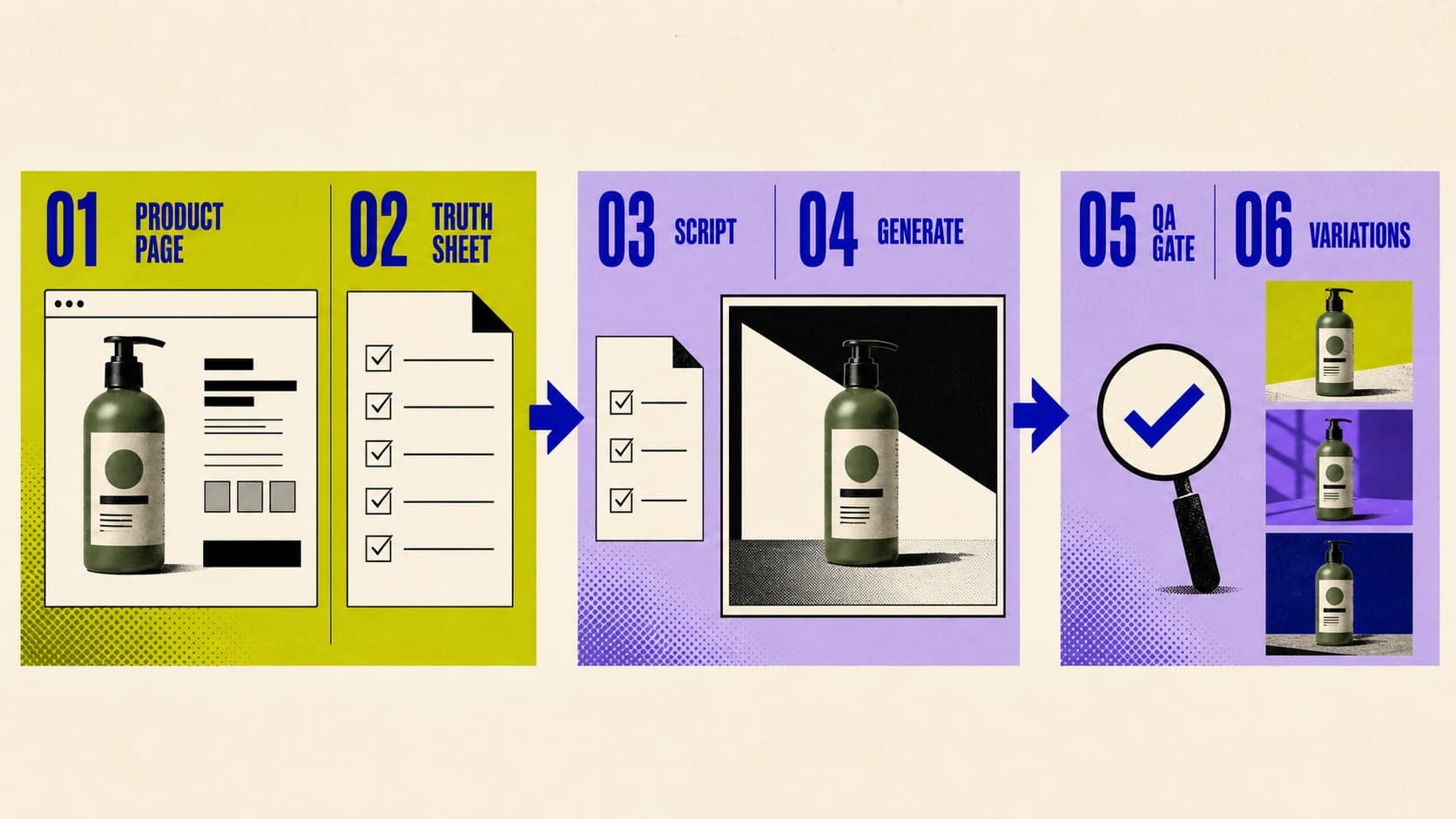
What does a URL-to-ad generator actually get from the page?
A URL-to-ad workflow usually reads the visible product name, description, images, price, and other page copy. It may then turn those inputs into a hook, script, scenes, voiceover, captions, and a UGC-style presenter.
That is useful automation. It is not product knowledge.
A product page may contain several variants, an expired discount in a banner, reviews for more than one SKU, or lifestyle images that show accessories sold separately. The generator can also treat a soft marketing phrase as a hard factual claim. TikTok's own Generate with AI workflow accepts a product URL, but its current guidance says that URL must contain no more than one product. That is a good rule even when you use another tool: start from one clean product page, not a collection or homepage. See TikTok's current Generate with AI documentation.
Before you generate anything, separate four kinds of information:
| Information type | Example | Can the script use it? |
|---|---|---|
| Verified product fact | Material, size, included accessory, current price | Yes, exactly as supported |
| Brand-approved benefit | The practical benefit tied to a real feature | Yes, without exaggerating the outcome |
| Customer language | A recurring phrase in reviews or support conversations | As an audience insight, not a fabricated quote |
| Unsupported or sensitive claim | Guaranteed result, invented statistic, medical outcome | No |
This takes a few minutes and prevents the expensive version of automation: generating a polished ad around the wrong fact.
Build a product truth sheet before writing the script
Use the product page as the starting evidence, then make the brief smaller. Copy this template:
Product:
Exact SKU or variant:
Landing-page URL:
Current price or offer:
Included in the purchase:

Verified features:
-
-
-

Approved benefits tied to those features:
-
-

Product images approved for the ad:
- Hero image:
- In-use image:
- Detail image:

Audience:
One problem or job:
One objection:
One next step:

Do not say or imply:
-
-
Record the exact variant. “Water bottle” is not enough when the linked page defaults to a 750 mL blue bottle but the selected image shows the 500 mL green version. If the offer changes by market or requires a code, put that condition in the sheet too.
Do not copy customer reviews into a synthetic presenter's mouth by default. The FTC explains that an AI stock avatar is not automatically prohibited, but the underlying testimonial can still be false and the presentation can still be deceptive. A fictional actor should not claim “I used this for three weeks” when nobody had that experience. See the FTC's current reviews and testimonials guidance.
Use reviews to find the audience's vocabulary and objections. Use a real, permissioned review only when the ad makes its source clear and preserves what the customer actually said.
Choose one ad angle, not every selling point
A product page is written to support a purchase decision. A short video ad has to earn the next few seconds. Trying to compress the whole page into one script produces the familiar AI rhythm: feature, feature, vague praise, urgent CTA.
Pick one of these jobs for the first version:
- Problem and mechanism: Name one problem, then show the feature that addresses it.
- Product demonstration: Show how the product is set up, used, or handled.
- Objection handling: Answer one credible reason a buyer hesitates.
- Feature-to-benefit: Connect one visible feature with one supported practical benefit.
- Offer: Explain a real, current promotion without changing the product claim.
An AI actor can present product facts or a demonstration. Be more careful with a testimonial angle. “The bottle uses a leak-resistant locking lid” is a product statement. “This bottle never leaked in my bag” presents a personal experience. Those sentences need different evidence.
Use a script that keeps claims attached to proof
The exact length depends on the format and delivery. A useful structure is more important than a magic word count:
Hook:
Name one audience problem, surprising product detail, or useful outcome.

Mechanism:
Show the verified feature that addresses the problem.

Proof:
Demonstrate the feature, show an accurate product detail, or cite an approved source.

Qualification:
Add a condition the buyer needs to know.

CTA:
Give one next step that matches the landing page.
Write the visual instruction beside each line. If the script says “locking lid,” the scene should show the actual lid—not a generated substitute that merely looks plausible. If the claim is not visible, add another approved image or rewrite the line.
Keep the first version deliberately plain. You are checking the argument and the product match, not trying to win an editing contest on generation one.
A worked example: from product page to bounded brief
Assume an illustrative product page sells one insulated bottle and explicitly lists these facts: 750 mL capacity, double-wall stainless-steel construction, a locking lid, and dishwasher-safe parts. The page includes approved photos of the bottle, lid, and cup-holder fit. It does not publish a temperature-retention test or say the bottle is leakproof.
The truth sheet should preserve that boundary:
Angle: Objection handling for commuters carrying a bottle in a bag.

Allowed:
- 750 mL capacity
- double-wall stainless-steel construction
- locking lid
- dishwasher-safe parts
- show the exact approved bottle and lid

Not allowed:
- "leakproof"
- "keeps drinks cold for 24 hours"
- a first-person story about using it on a commute
- a different lid, color, or capacity
A bounded script could read:
Hook: A daily bottle should not make you choose between capacity and a bag-friendly lid.

Mechanism: This 750 mL bottle uses double-wall stainless steel and a locking lid.

Proof: Show the approved bottle, then a close view of the real lid locking into place.

Qualification: Check the product page for the current color and care options.

CTA: See the bottle and current offer.
Notice what is missing: no invented commuter, no unverified leak test, no temperature promise, and no fake review. The script is less dramatic than a fabricated testimonial. It is also publishable.
How do you generate the ad in Cospark?
Disclosure: Cospark publishes this guide and offers the URL-to-Ad workflow described below.
- Open Cospark's URL-to-Ad app and paste the direct page for one product.
- Compare the extracted product name, images, copy, and price with your truth sheet. Correct the input before generating if they disagree.
- Give the agent the selected angle, allowed claims, prohibited claims, audience, and CTA. Do not rely on the URL alone to supply the creative strategy.
- Add the approved product images you want the ad to use. If a shot needs product motion, follow the separate product-photo-to-video fidelity workflow.
- Generate one control ad. Review the script and storyboard before spending time on variants.
- Repair the failed scene or line when possible instead of changing the entire concept.
- Export the accepted format only after the claims, product, captions, disclosure, and landing page pass the checks below.
The same method works in other URL-to-ad tools. The important part is the boundary between extraction and approval: the tool can propose; the product owner still verifies.
What should make you reject a generated ad?
Watch the ad once at normal speed. Then pause on the product scenes and read the captions without audio.
Reject or revise the ad if:
- the price, discount, stock status, variant, or included items do not match the landing page;
- the product changes shape, label, color, material, size, controls, or accessories;
- the script turns a feature into a result the page does not support;
- an AI actor implies personal use, a customer identity, or a typical outcome without evidence;
- a real review is shortened in a way that changes its meaning;
- the opening promises one product or offer and the click leads to another;
- captions change a product name, number, unit, or qualification;
- music, footage, a person's likeness, or a competitor ad is used without the necessary rights;
- the required AI or commercial-content disclosure is missing;
- the CTA does not match the action available on the landing page.
TikTok's current advertising policy requires a label or clear disclosure for substantially AI-generated or modified media and restricts misleading or exaggerated product outcomes. The platform says undisclosed AIGC can be rejected or restricted. Review the live TikTok misleading and AIGC policy before launch because policy and market requirements can change.
For Meta Reels, review the 9:16 crop, audio, and safe zone rather than assuming a square or landscape asset will translate cleanly. Meta's Reels guidance recommends vertical video with audio and key messages inside the safe zone. Google Ads also checks for a mix of horizontal, vertical, and square assets, along with early branding and voiceover, in its current creative guidance.
Passing an ad platform's automated review does not prove the claim is accurate. Your truth sheet is still the final source.
How should you create useful variations?
Once the control ad passes, duplicate it and change one variable. Start with the hook because it can change the opening reason to watch without forcing you to rebuild the product evidence.
For example:
| Version | Change | Keep fixed |
|---|---|---|
| Control | Original problem hook | Product, proof, actor, offer, CTA, format |
| Hook B | Feature-led opening | Everything after the hook |
| Hook C | Objection-led opening | Everything after the hook |
| Visual B | Different approved first product shot | Script, actor, offer, CTA |
| CTA B | Different accurate next-step phrasing | Hook, proof, visuals, offer |
Do not change the hook, presenter, offer, music, pacing, and visual style at once and call the result an A/B test. You will have two ads but no clear explanation for the difference.
Track accepted output, not only rendered output. If a tool generates ten videos and four survive claim, product, and quality review, your useful denominator is four. This is the cost and throughput that should inform the next subscription or production decision.
For the wider campaign framework, see what makes AI ad creative useful to test.
When is a product URL the wrong starting point?
Do not force the workflow when the page is not a trustworthy source.
Start from a manual brief instead when:
- the URL is a collection, marketplace search result, or page with multiple products;
- the offer, price, or inventory changes too quickly to verify at publish time;
- the strongest angle depends on evidence that is not on the page;
- the ad requires a real customer, expert, founder, or licensed creator;
- the product must be demonstrated physically in a way generation cannot represent accurately;
- the category has legal, medical, financial, or platform rules that require specialist review.
Sometimes the right input is not more automation. It is a cleaner product page, an approved claim library, better product photography, or a real person with a real experience.
Use the URL as evidence
Treat the product URL as a box of source material, not permission to improvise. Extract only what you can verify, choose one argument, keep claims attached to visible proof, and reject the ad when the product or experience becomes fictional.
Then use the generator for what it is good at: turning an approved brief into scenes, voice, captions, and controlled variations without starting from a blank timeline every time.