
Seedream AI is ByteDance's image generation model, and it has quietly climbed to #10 on the LM Arena leaderboard with a score of 1147. The latest version, Seedream 5.0 Lite, is the first image generation model to ship with chain-of-thought reasoning and real-time web search built in. At $0.035 per image, it undercuts nearly every competitor on price while matching them on output quality for most commercial use cases.
Here's the full picture.
What is Seedream?
Seedream is a family of AI image generation models developed by ByteDance's Seed research team. Unlike most image generators that treat generation and editing as separate workflows, Seedream bakes both into a single architecture. You can generate from a text prompt, then edit the result with natural language ("remove the background," "change the shirt color to blue") without switching tools or re-uploading anything.
The model handles text-to-image generation, image-to-image editing, multi-reference composition (feeding it multiple source images to combine elements), and style transfer. It supports bilingual prompts in English and Chinese, which makes sense given ByteDance's market position.
What caught most people's attention, though, was the text rendering. AI image generators have historically been terrible at putting readable text into images. Seedream 4.5 was the first model in this space to get text rendering reliably right, and 5.0 pushed it further. If you need an ad creative with a headline baked into the image itself, this matters.
How has Seedream evolved?
ByteDance has iterated fast. Four major versions shipped in roughly 18 months.
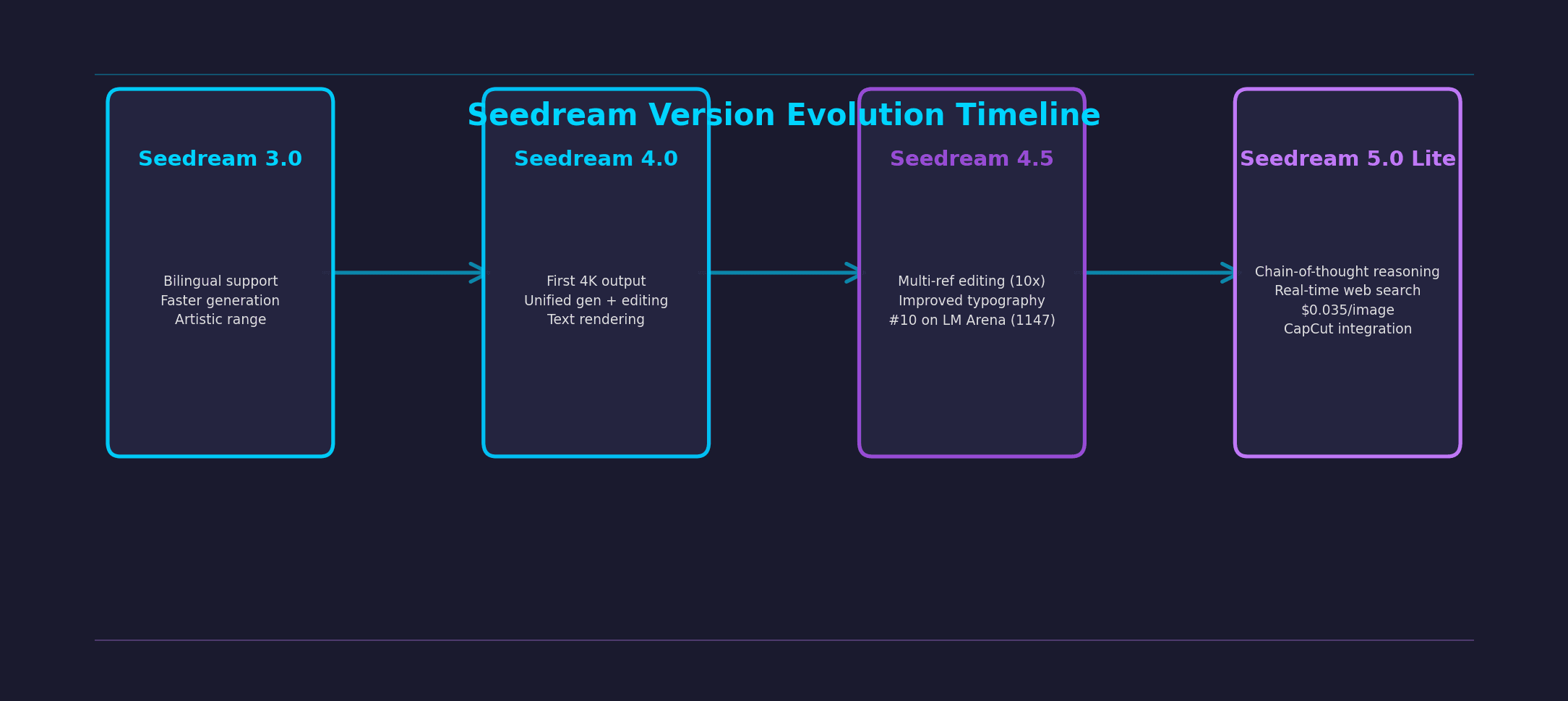
The version that went global. Added bilingual prompt support (English and Chinese), faster generation speeds, and a wider range of artistic styles. It was competitive but not remarkable, roughly on par with what Stable Diffusion XL could do at the time.
The version that got people talking. First model in its class to support native 4K output. Unified generation and editing into one architecture, so you could generate an image and then make precise edits without leaving the model. Text rendering accuracy jumped from "mostly gibberish" to "actually readable." ByteDance started positioning it for commercial use cases like advertising and product design.
The refinement release. Multi-reference editing arrived, letting you feed up to 10 source images and the model would composite elements from all of them while maintaining fidelity to each reference. Typography and dense text rendering got another upgrade. This is the version that hit #10 on LM Arena with a 1147 score, putting it ahead of several more hyped models.
The current flagship, released February 2026 alongside Seedance 2.0. Two features set it apart from everything else on the market. First, chain-of-thought visual reasoning: the model performs multi-step inference before generating, which means it handles complex spatial relationships and logical prompts far better than models that just map text to pixels. Second, real-time web search: Seedream 5.0 can pull current information from the web during generation, so it can produce images reflecting recent events, trends, or data. No other image model does this. Price dropped 22% from 4.5, landing at $0.035 per image.
How does Seedream compare to other image generators?
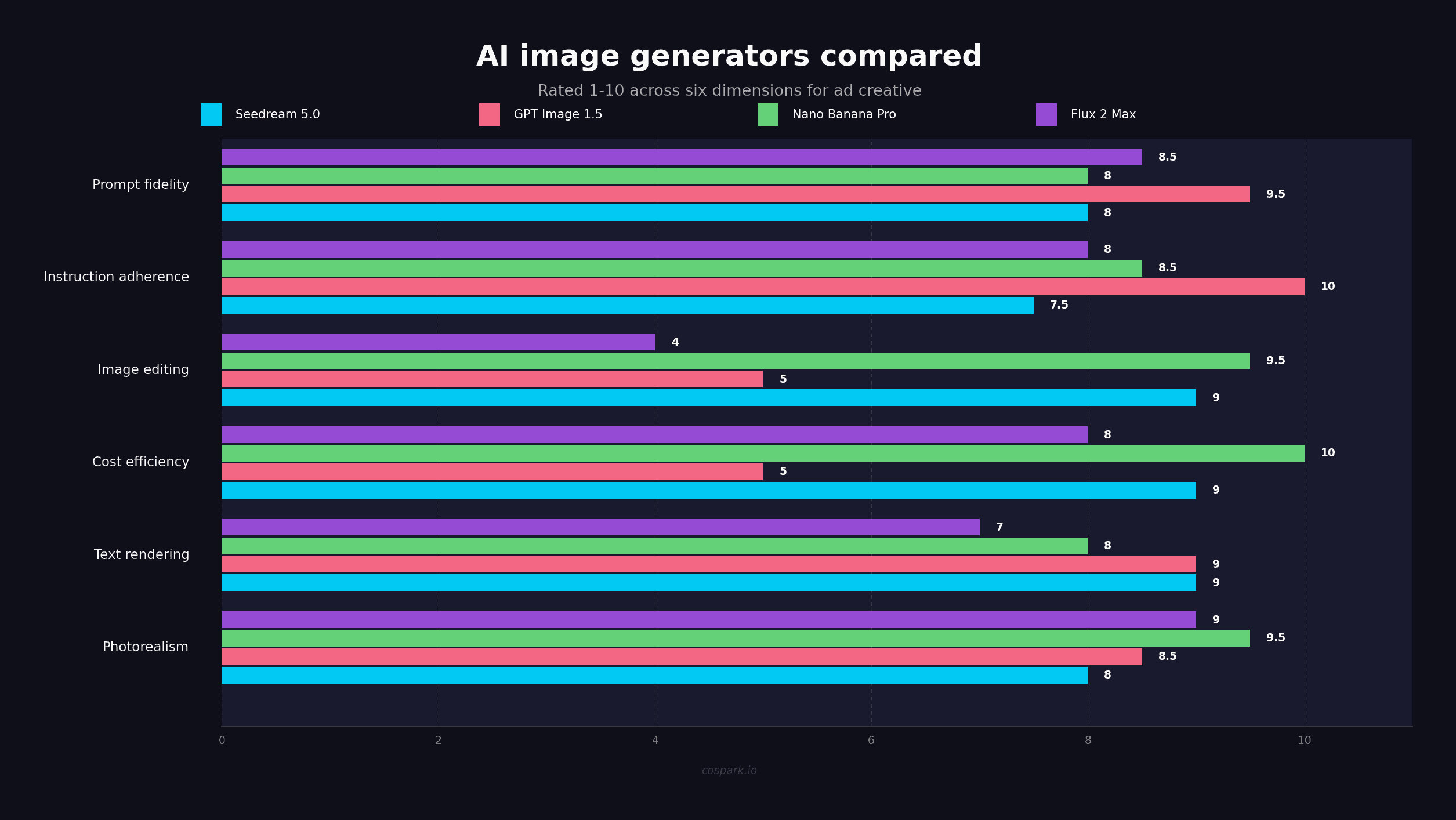
This is the question everyone searching for "seedream ai" actually wants answered. Here's how it stacks up for the dimensions that matter to ad creators and marketers.
| Feature | Seedream 5.0 | Midjourney v7 | DALL-E 3 | Flux 2 Pro | Imagen 4 |
|---|---|---|---|---|---|
| Photorealism | Strong | Best-in-class | Good | Best-in-class | Best-in-class |
| Text rendering | Best-in-class | Weak | Strong | Good | Strong |
| Cost per image | $0.035 | ~$0.10+ | ~$0.04 | ~$0.05 | ~$0.04 |
| API access | Full REST API | Limited | Full API | Full API | Google Cloud |
| Image editing | Built-in | None | Basic | Third-party | Growing |
| Multi-reference input | Up to 10 images | None | None | Limited | Limited |
| 4K output | Yes | Yes | No (1024px) | Yes | Yes |
| Bilingual prompts | English + Chinese | English | English | English | English |
The honest take: Midjourney still produces the most aesthetically refined output if you want art-directed, stylized images. Flux 2 Pro and Imagen 4 win on raw photorealism. But Seedream owns a different niche. It's the best option when you need high-volume image generation with built-in editing, multi-reference composition, and accurate text rendering at the lowest cost per image.
For ad teams producing 50+ images a day across multiple campaigns, the cost difference compounds fast. At $0.035 per image versus Midjourney's subscription-based pricing, Seedream at scale is roughly 3x cheaper for high-volume workflows.
Seedream 4.5 is still available alongside 5.0 Lite. ByteDance recommends 4.5 when you care most about reference fidelity and typography in professional creative work. Use 5.0 Lite when you want the reasoning capabilities and lower cost.
Where can you access Seedream?
Access is scattered across multiple platforms right now. No single "Seedream app" exists the way Midjourney has its Discord or DALL-E lives inside ChatGPT.
BytePlus (official API)
ByteDance's cloud platform offers the official Seedream API at $0.035 per image for 5.0 Lite. You get 50 free images to start. This is the most direct route if you're building Seedream into a product or workflow. The API uses the standard /v1/images/generations endpoint and is OpenAI-compatible.
Third-party platforms
Several platforms host Seedream models with their own interfaces: getimg.ai, WaveSpeedAI, fal.ai, Replicate, RunComfy, and Atlas Cloud. Pricing varies, but most are competitive with BytePlus. These are useful if you already use one of these platforms for other models and want Seedream alongside them.
CapCut and Jianying
Seedream 5.0 Lite is integrated directly into ByteDance's video editors. If you're already editing in CapCut, you can generate images without leaving the app. Useful for quick social media assets, less useful for high-volume ad production.
What does Seedream mean for ad creators?
The practical angle for anyone making ads is this: Seedream fills a gap that other image generators leave open.
Most ad teams currently use Midjourney or DALL-E for hero images, then manually edit in Photoshop or Figma. Seedream collapses that into one step. Generate the base image, edit it with text prompts, render text overlays directly in the image, and export at 4K. All within the same model call. No round-tripping between tools.
The multi-reference feature is particularly useful for ad creative. Feed it your product photo, a style reference from a competitor's ad you like, and a layout reference, and Seedream composites them into a new image that draws from all three. It's like having a designer who can look at three reference images and create something new that borrows the right elements from each.
And the text rendering is a real differentiator for static ad creative. If your ad needs a headline, a CTA button, or product specs overlaid on the image, Seedream handles it natively. With Midjourney, you'd generate the image and then add text in a separate tool.
Should you use Seedream for static ad creative?
It depends on your volume and workflow.
If you're producing a handful of hero images per week and want each one to look like it came from a creative director's mood board, Midjourney or Flux Pro are still the better picks. Their output has a level of visual polish that Seedream hasn't matched yet.
If you're producing dozens or hundreds of ad variations daily and need an API-first workflow with built-in editing, Seedream is the strongest option available. The combination of generation, editing, multi-reference input, text rendering, and price makes it hard to beat for high-volume commercial work.
For most ad teams, the practical move is using Seedream for the bulk of your production and Midjourney for the hero shots. Let each model do what it does best.
Frequently asked questions
Is Seedream free to use?
Seedream 5.0 Lite offers a free trial of 50 images through BytePlus. After that, it costs $0.035 per image through the official API. Some third-party platforms like getimg.ai and Replicate offer their own free tiers with limited generations.
What is the difference between Seedream and Seedance?
Seedream generates static images. Seedance generates video. Both are built by ByteDance's Seed research team and released around the same time (February 2026 for the latest versions), but they're separate models for separate use cases. Seedream handles text-to-image and image editing; Seedance handles text-to-video with audio.
Can Seedream generate text in images?
Yes, and it's one of its strongest features. Starting with version 4.5, Seedream generates readable, correctly spelled text when you include it in your prompt. This includes headlines, product labels, button text, and dense copy. Most competing models still struggle with text rendering.
How does Seedream compare to DALL-E 3?
Seedream 5.0 Lite is cheaper ($0.035 vs ~$0.04 per image), supports higher resolution output (4K vs 1024px), includes built-in image editing, and handles multi-reference composition. DALL-E 3 has tighter integration with ChatGPT and slightly better prompt understanding for conversational instructions. For ad production at scale, Seedream offers more for less.
What resolution does Seedream output?
Seedream 4.0 and later versions support up to 4K resolution output. This is native 4K, not upscaled. The model generates at that resolution directly. For web ads, social media, and digital campaigns, 4K is more than sufficient.
Last updated: February 27, 2026